How to Take the Perfect LinkedIn Headshot in 2025
Learn the essential tips and best practices for creating a professional LinkedIn headshot that attracts recruiters and makes a strong first impression.
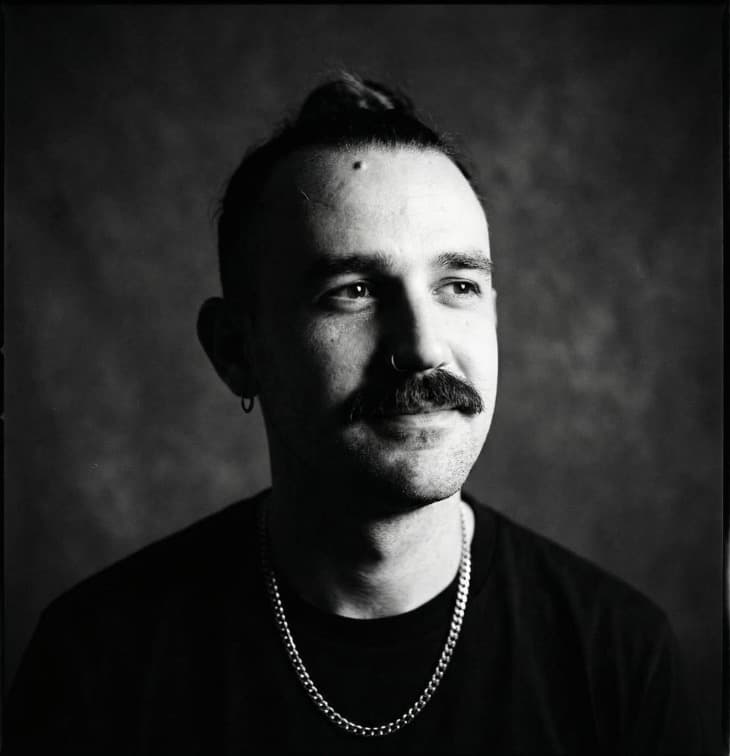
Your LinkedIn headshot is often the first impression potential employers, clients, and professional connections have of you. Studies show that profiles with professional headshots receive 21x more profile views and 36x more messages than those without.
In this comprehensive guide, we'll walk you through everything you need to know to create the perfect LinkedIn headshot in 2025.
Why Your LinkedIn Headshot Matters
Your profile photo is more than just a picture—it's a crucial component of your personal brand. Here's why it matters:
- First Impressions: You have 7 seconds to make a first impression online
- Credibility: Professional photos increase perceived trustworthiness by 40%
- Visibility: LinkedIn's algorithm favors profiles with complete information, including photos
- Networking: People are 14x more likely to connect with profiles that have photos
LinkedIn Photo Requirements
Before we dive into tips, let's cover LinkedIn's technical requirements:
- Minimum size: 400 x 400 pixels
- Maximum size: 7680 x 4320 pixels
- File size: Maximum 8MB
- Formats: JPG, PNG, or GIF
- Recommended: Square crop, at least 1000 x 1000 pixels
10 Essential Tips for the Perfect LinkedIn Headshot
1. Choose the Right Background
Your background should be clean and professional without being distracting:
- Solid colors (gray, white, or soft blue) work best
- Avoid busy patterns or cluttered settings
- Natural outdoor settings can work for creative industries
- Ensure good contrast between you and the background
2. Dress for Your Industry
Wear what you'd wear to work in your industry:
- Corporate/Finance: Business suit, conservative colors
- Tech/Startup: Business casual, smart casual acceptable
- Creative: Express your style while maintaining professionalism
- General rule: Dress one level up from your daily work attire
3. Nail the Lighting
Good lighting can make or break your headshot:
- Natural light is best—shoot near a window
- Face the light source for even illumination
- Avoid harsh overhead lighting that creates shadows
- Golden hour (early morning or late afternoon) provides the most flattering light
- If using artificial light, use soft, diffused lighting
4. Perfect Your Expression
Your facial expression should be approachable yet professional:
- Smile with your eyes: A genuine smile engages your whole face
- Think of something that makes you happy
- Avoid forced or overly serious expressions
- Practice in front of a mirror beforehand
- Try the "squinch" technique (slight squint) for confidence
5. Get the Framing Right
Proper framing ensures you look professional and approachable:
- Show head and shoulders (or head and upper chest)
- Leave some space above your head
- Center yourself in the frame
- Face the camera straight on or at a slight angle
- Ensure your face takes up 60-70% of the frame
6. Mind Your Posture
Good posture conveys confidence:
- Stand or sit up straight
- Pull shoulders back slightly
- Tilt chin down slightly to avoid looking down at viewers
- Turn body 15-30 degrees from camera for a more dynamic look
- Keep neck elongated
7. Choose Colors Wisely
Colors can impact how you're perceived:
- Blue: Trustworthy, dependable (great for most industries)
- Black/Gray: Professional, sophisticated
- White: Clean, simple (ensure good background contrast)
- Jewel tones: Confident, vibrant (good for creative roles)
- Avoid: Neon colors, busy patterns, all-white or all-black
8. Keep It Current
Your LinkedIn photo should look like you right now:
- Update every 1-2 years at minimum
- Update after significant appearance changes
- Use a recent photo (within the last year)
- Your photo should match your in-person appearance
9. Optimize for Mobile
Over 60% of LinkedIn users access the platform on mobile:
- Ensure your face is clearly visible at small sizes
- Avoid fine details that disappear when scaled down
- Test how your photo looks on both desktop and mobile
- Higher resolution is better for clarity
10. Professional Editing (But Don't Overdo It)
Light editing is acceptable and expected:
- Adjust brightness and contrast
- Remove temporary blemishes
- Soften harsh shadows
- Sharpen the image slightly
- Avoid: Heavy filters, excessive smoothing, changing your appearance
The AI Headshot Advantage
Traditional photography for a LinkedIn headshot can cost €150-500 and requires scheduling, travel, and waiting for edits. AI headshot generators offer a modern alternative:
Benefits of AI Headshots:
- Cost-effective: 95% cheaper than traditional photography
- Instant: Get your headshot in minutes, not weeks
- Variety: Generate multiple styles and expressions
- Convenience: No studio visit required
- Consistent quality: Professional lighting and backgrounds every time
- Easy updates: Refresh your photo anytime
How AI Headshots Work:
- Upload a clear selfie or casual photo
- Choose your preferred professional style
- AI enhances lighting, background, and composition
- Download your professional headshot
- Upload to LinkedIn
Common LinkedIn Headshot Mistakes to Avoid
Don't sabotage your professional image with these common errors:
❌ Group photos or cropped group shots ❌ Selfies with visible phone or arm ❌ Sunglasses or heavily filtered photos ❌ Photos from social events (weddings, parties) ❌ Overly casual photos (beach, vacation) ❌ Photos where you're not clearly visible ❌ Outdated photos from 5+ years ago ❌ Low-resolution or blurry images ❌ Distracting backgrounds ❌ No photo at all
Industry-Specific Guidelines
Corporate/Finance
- Conservative business attire
- Neutral background (gray, white, navy)
- Minimal jewelry
- Traditional professional styling
Tech/Startup
- Business casual acceptable
- Can show personality
- Modern, clean backgrounds
- More relaxed expressions okay
Creative Industries
- Express your style
- Bolder colors acceptable
- More artistic backgrounds possible
- Show your creative side
Healthcare/Medical
- Professional attire (white coat if applicable)
- Trustworthy, approachable expression
- Clean, clinical-looking background
- Conservative styling
How to Upload Your LinkedIn Headshot
Once you have the perfect headshot:
- Go to your LinkedIn profile
- Click on your current photo (or the camera icon)
- Select "Upload photo"
- Choose your file
- Adjust cropping if needed
- Click "Apply"
- Save changes
Measuring Success
After updating your headshot, track these metrics:
- Profile views: Check if they increase
- Connection requests: Monitor incoming requests
- Messages: Note any increase in recruiter outreach
- Search appearances: See if you appear in more searches
Give it 2-4 weeks to see the full impact.
Final Thoughts
Your LinkedIn headshot is a small investment that can have a significant impact on your career. Whether you choose traditional photography or modern AI generation, the key is to present yourself as professional, approachable, and authentic.
Remember: A great LinkedIn headshot isn't about looking perfect—it's about looking professional and approachable.
Ready to upgrade your LinkedIn presence? Generate your professional headshot with AI in just minutes, or explore our LinkedIn-specific headshot tips for more detailed guidance.
Have questions about LinkedIn headshots? Drop them in the comments or reach out to our team. We're here to help you make the best possible first impression!